Can boxes be created on DeepBox for different clients?
Automatically translated
It is possible to create a box in DeepBox for all clients listed in Abacus.
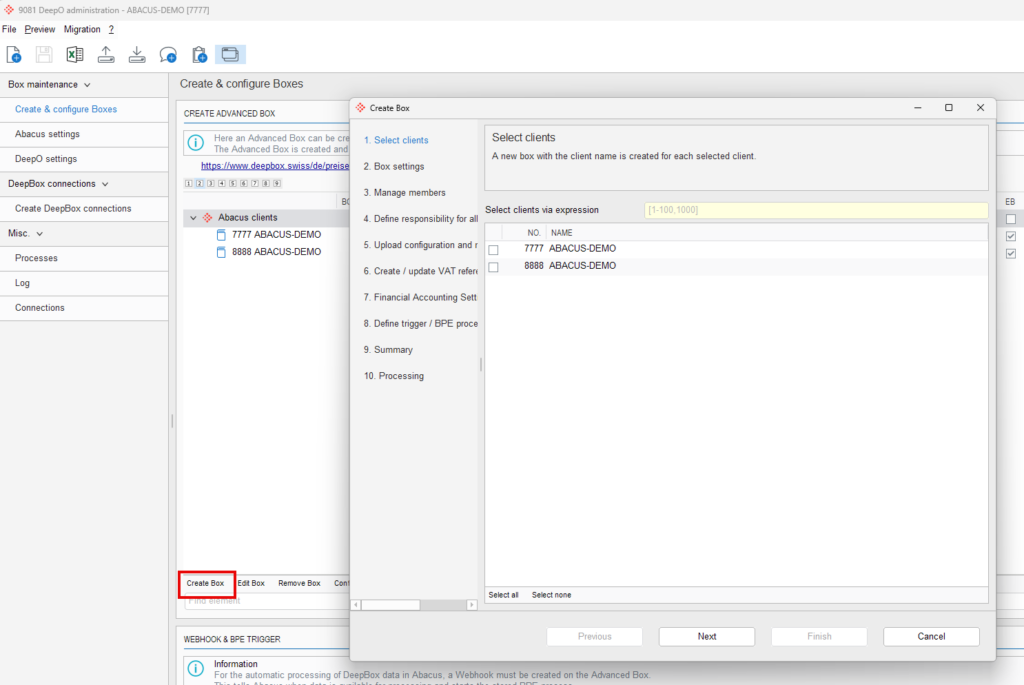
Create boxes per client in Q9081
In the “Q9081 DeepO Administration” program, under “Create & Configure Boxes,” you can launch the wizard by clicking the “Create Boxes” button. In the first step, “Select Clients,” choose the desired clients from the list—a new box with the client’s name will be created for each selected client.
Further information
- Configuration & Master Data: When creating the box, master data (from Abacus) can be imported directly so that the box is configured correctly from the start. You can also adjust this information later or resync it.
- Trigger / Webhook: To ensure that documents processed in DeepBox are automatically processed further in Abacus, a webhook must be set up in the box. This webhook notifies Abacus as soon as new documents are available and triggers the defined BPE process.
- If a client is further divided into business units and companies, or is managed as an AbaImmo client, the process for creating boxes differs slightly. You can find more details in this FAQ article: Creating boxes for clients with business units, companies, and AbaImmo:
Did this answer your question?
Related articles
Configuration & master data
The master data can be loaded from Abacus into the DeepBox. This can either be done directly when creating the box under step 4, or for an existing box in the “Q908 DeepCloud...
Trigger / Webhook
For the “Process documents from DeepBox” process to work automatically, a trigger / webhook must be created in the “Q908 DeepCloud Administration” program. ...
Create boxes for clients with business areas, companies, AbaImmo
Depending on the client, the boxes from the ‘Q908 DeepCloud Administration’ program can be created at different levels: For a regular client at client level (1 box) For...

