Userfields
Automatically translated
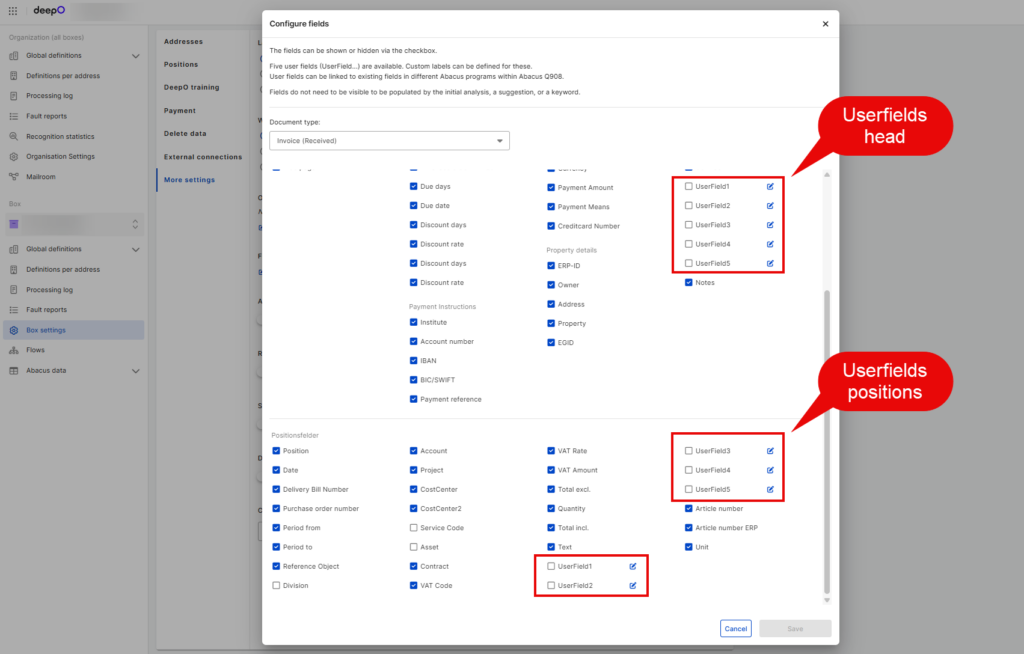
Up to five user fields can be displayed in the DeepO Editor under Miscellaneous and Position fields, which can be mapped with defined Abacus fields.
Fade-in / renaming
If the five user fields are not visible, they must be displayed in the DeepO settings / Box settings / Configure fields in the DeepO Editor / Select invoice type. The fields can also be renamed here using the small icon on the right.
Mapping with an Abacus field
In the Abacus program “Q9081 DeepO Administration,” the user fields in the DeepO settings can be linked to a defined field in Abacus. Once a client is selected, you can define the mapping for the user fields by document type, as well as at the header and line item levels.
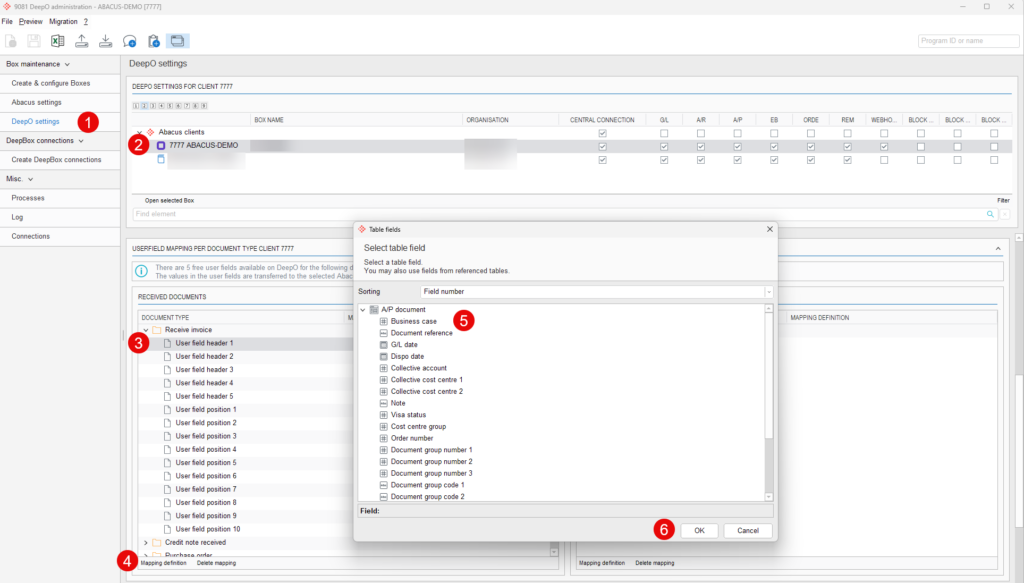
The following fields are available:
| Invoice Received Header Level and Credit Memo Received Header Level | Invoice Received (Line Item Level) and Credit Memo Received (Line Item Level) |
|---|---|
| Defined fields of the KBL table | Defined Fields and User Fields in the KPS Table |
| Invoice Sent (Header Level) and Credit Memo Sent (Header Level) | Invoice Sent at Line Item Level and Credit Memo Sent at Line Item Level |
| Defined fields in the DBL table | Defined Fields and User Fields in the DPS Table |
| Order: Header Level | Order by Item Level |
| Defined Fields in the DKO Table | Defined Fields in the DPO Table |
The user fields must be created in advance in program “626 Database field definition”.
When the user field is filled in in the DeepO Editor, the content is automatically stored in the mapped field in Abacus.
Notes
User fields are available as follows starting with the following versions:
- User fields at the line item level for the document type “Invoice (Received)” will be available for vendor invoices starting with v2025 SP 15.05.2025
- User fields for the “Order” document type will be available starting with v2025 SP on May 15, 2025
- User fields for the document type “Credit Memo (Received)” will be available for vendor invoices starting with v2025 SP on September 15, 2025
- User fields for the document types “Invoice (Sent)” and “Credit Memo (Sent)” will be available for customer invoices starting with v2026 RC on December 1, 2025.
Did this answer your question?
Related articles
Who is authorized to make changes in the "Q908 DeepCloud Administration" and "Q9081 DeepO Administration" programs?
Users with the following user classes can open the “Q908 DeepCloud Administration” and “Q9081 DeepO Administration” programs and make the necessary ...
DeepO recognition behavior
Address recognition There are some factors for the recognition of addresses that are weighted higher for DeepO.For example, data from a QR code or ZUGFeRD is given preferential ...
Train DeepO
All fields in the DeepBox can be filled manually. The “Train DeepO” function can be used to automate the filling of the fields. Activation To be able to use the ...

