Functionality – Activate connection
Automatically translated
Process
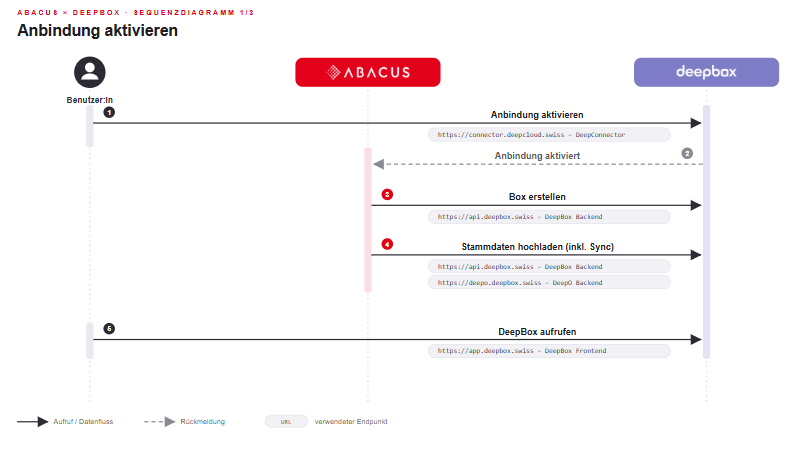
- Activate connection in the Q908 program, DeepCloud Connector opens, log in with account, select the corresponding organization and name the connection
- Connection is activated
- Create box in program Q9081
- Upload the master data in the Create box dialog (this can also be uploaded afterwards via Master data)
- Call up DeepBox
Did this answer your question?
Related articles
Functionality - Processing documents via DeepBox
Manufacturing process Attention: The webhook can be blocked by the security settings of the Abacus server. This means that the BPE process stored in the Q908 is not started. ...
Technical requirements
Incoming connection Webhook accessibility SSL certificate Externally presented certificates (public certificates) must be valid and contain all intermediate certificates. ...
Document processing in accounts receivable, accounts payable and financial accounting
With DeepBox, documents (accounts receivable and accounts payable) can be posted efficiently and automatically. By connecting DeepBox to the Abacus system, repetitive work can be ...

