Settle outstanding invoices
Automatically translated
Outstanding invoices
From three unpaid invoices, products in your account will remain blocked until the outstanding amounts have been paid. This applies to both DeepBox and DeepSign.
Note for DeepBox users: If there are fewer than three outstanding invoices, a notice is displayed in the owner dashboard at an early stage without blocking use.
How do I pay my outstanding invoices?
Owners of an organization as well as admins or members who are stored as billing contacts can view open invoices in DeepAdmin (1). The filter (2) can be used to restrict the view according to payment status.
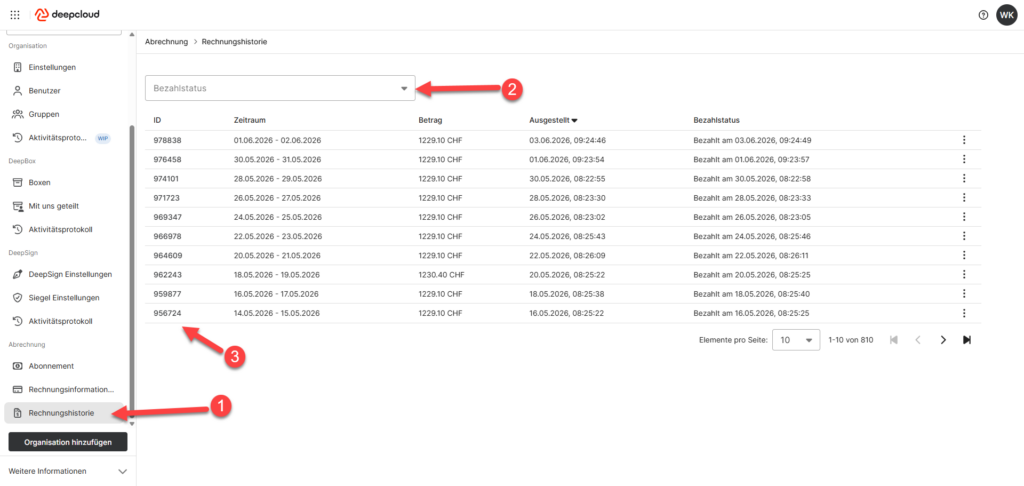
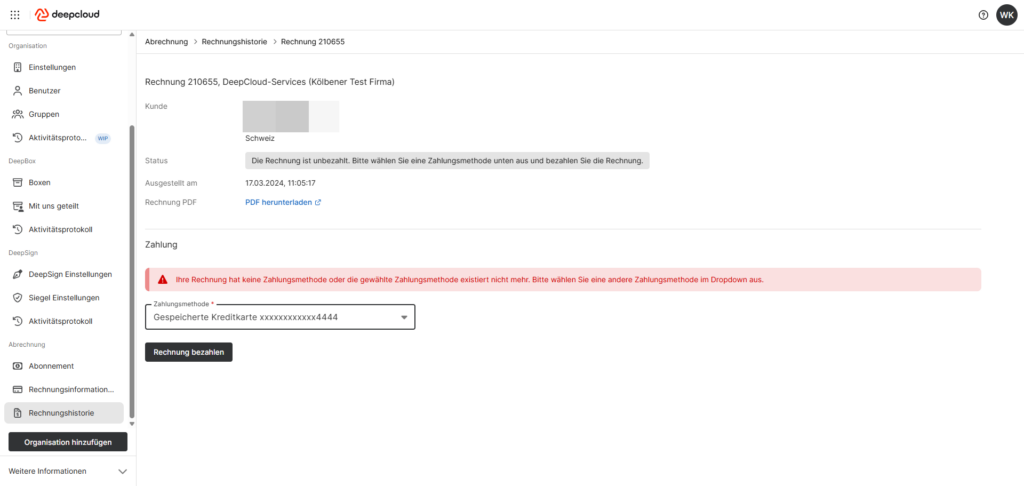
A click on the invoice ID (3) opens the invoice details – the invoice can be paid from there.
Did this answer your question?
Related articles
Why is my account blocked?
There are various reasons why access to DeepBox or DeepSign may be restricted. The blocking depends on which product you use and which costs are incurred. Missing payment method If...
How do I change a payment method?
The payment method can be adjusted and managed by the owner of the organization in the account management under “Billing Information“. In the “Payment ...
Define Billing Recipient
The billing information for your organization can only be managed and adjusted by owners in DeepAdmin. Edit Billing Information The following billing information can be updated: ...