Standardised VAT and item workflow

Automatically translated
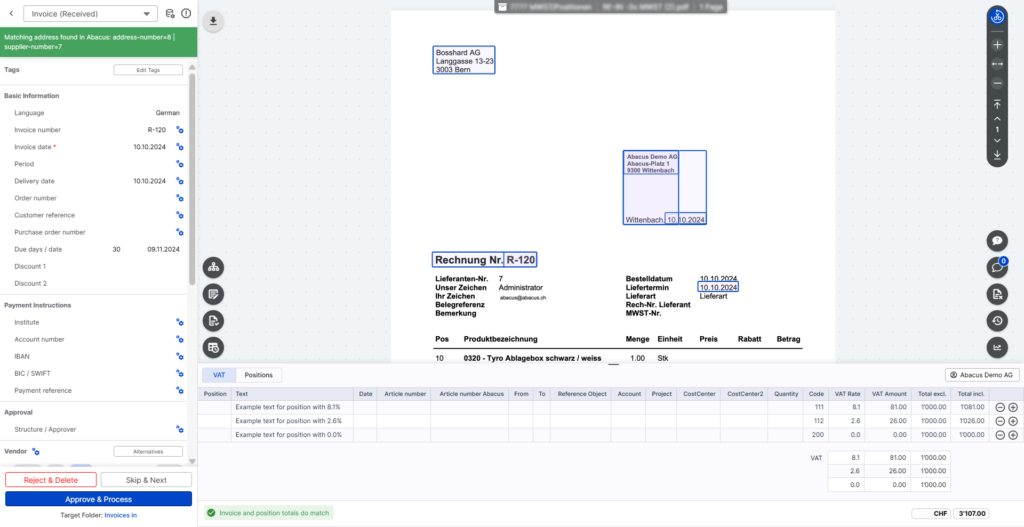
The “VAT tab” in the DeepO Editor has been fundamentally revised and aligned with the “Positions tab”.
Previously, only manual entries were possible in the “VAT tab”. Automated entries (e.g. via suggestions) required a change to the “Positions” tab. In addition, the same fields were not available in the “VAT tab”.
Applies from 26.02.2026:
- The “VAT tab” now contains the same fields as the “Items tab”
- Field values can also be set automatically in the VAT tab via “Suggestions” (if “Train DeepO” is activated)
- It is no longer necessary to switch to the “Positions tab” for this
In future, the only difference between the two tabs will be the type of grouping:
- VAT tab: Grouping by VAT rate (one item per VAT rate)
- Items tab: all document items are read out individually (if “Item recognition” is activated)
This customisation enables end-to-end automation for all DeepO users who work with “Train DeepO”. A particularly popular use case is the automated setting of the VAT code based on the recognised VAT rate, especially if the derivation logic cannot be mapped in Abacus.
Did this answer your question?
Related articles
Recognize and activate document positions
Recognition positions By default, the VAT summary is used in the Advanced boxes. With this recognition, one item is created for each VAT rate recognized, regardless of the number ...

Train DeepO
All fields in the DeepBox can be filled manually. The “Train DeepO” function can be used to automate the filling of the fields. Activation To be able to use the ...
VAT summary / Activate document items
As of 26.02.2026, the two tabs “VAT” and “Positions” in the DeepO editor have been harmonized. Suggestions can now also be created in the VAT summary. Basic...