What is the procedure for incorrect documents?
Automatically translated
An incorrect document can occur if certain data does not correspond to the requirements in Abacus. Examples of this are
- Zip code: The zip code entered in the DeepBox editor does not correspond to the standard.
- Account or VAT code: The specified account or VAT code does not exist or is inactive.
If a receipt cannot be posted correctly in Abacus due to such errors, it is automatically moved to the corresponding applicationinbox.
Further processing via the pending documents
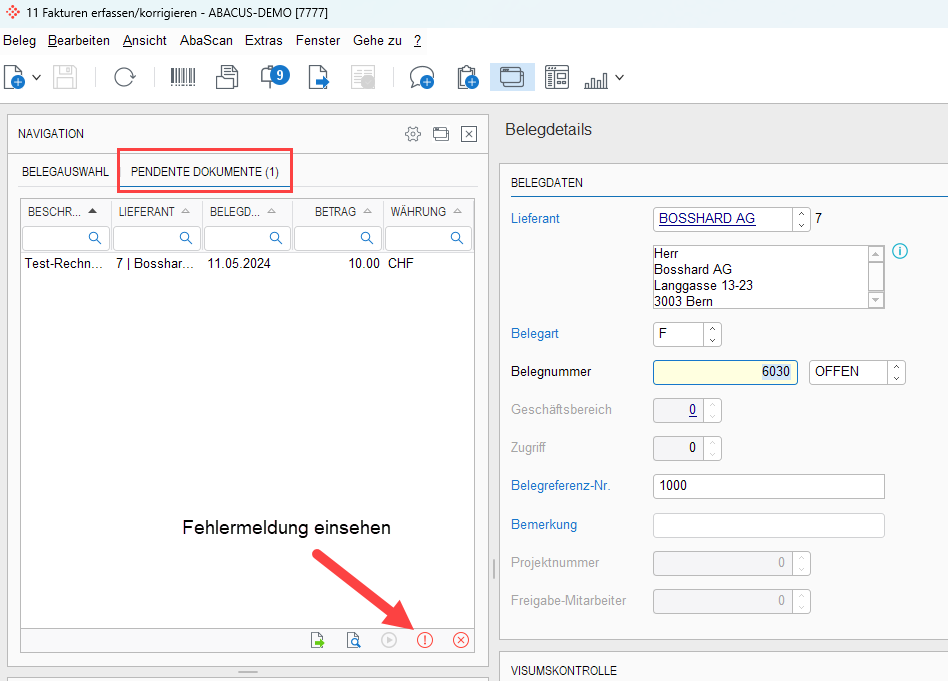
The “Pending documents” tab is available in the programs D111 “Post documents” (debtors) and K11 “Enter/adjust invoices” (creditors) directly in the navigation bar. There you can:
- View the PDF of the document
- Call up the detailed error message
- Correct the incorrect data directly in Abacus
- then save the document with the updated data.
Did this answer your question?
Related articles
Control of automatic document processing for new suppliers
In the Abacus program “K621 Application settings” you can set whether vouchers from new suppliers should be posted automatically or not. Definition of If an invoice ...
Can the same document be processed several times via the DeepBox?
Yes, identical vouchers can be processed several times via the DeepBox. To ensure that duplicate entries are recognized in Abacus, the following settings can be made in the Abacus ...
Setting in the "K31 supplier master" so that DeepBox documents are not processed automatically
A flag can be set for each supplier in the “K31 Supplier master” so that the vouchers are not posted automatically. These documents can then be processed via the ...