Free account assignment references
Automatically translated
With free account assignment references, additional reference tables can be stored in DeepO. This allows account assignments such as account, cost center, project or VAT code to be set automatically based on values in the document. To do this, a value from the document is searched for in a stored reference table and a defined return value is adopted. The free account assignment references are available at both the box level and the organizational level.
Application example
An invoice contains the value “SEHTEST” in the item text.
This value is searched for in a free account assignment reference. If a suitable entry is found, the defined cost center or the corresponding account can be set automatically.
Create a reference table
1. Open DeepO settings
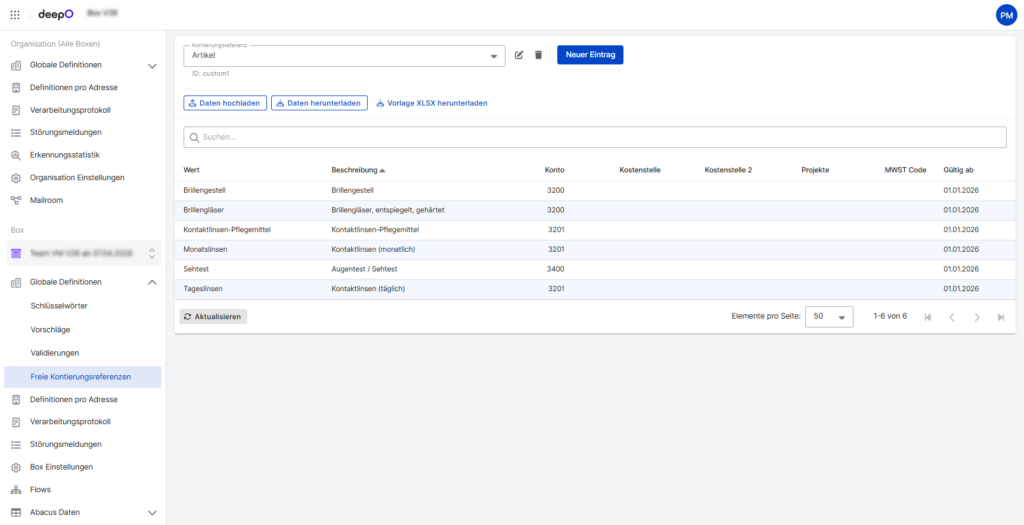
2. Open “Global Definitions” → “Free Account Assignment References”
3. Select “New Entry”
4. Enter a description
5. Download the sample Excel file
5. Fill out the Excel file and upload it again
The following columns are available in the sample Excel file:
- Value
- Description
- Account
- Cost center
- Cost center 2
- Project
- VAT code
- Valid from
After uploading, an internal reference ID is automatically created (for example “custom1”).
Use in suggestions
Free account assignment references can be used in suggestions with the “Look up” function. The function can be used at both header and item level.
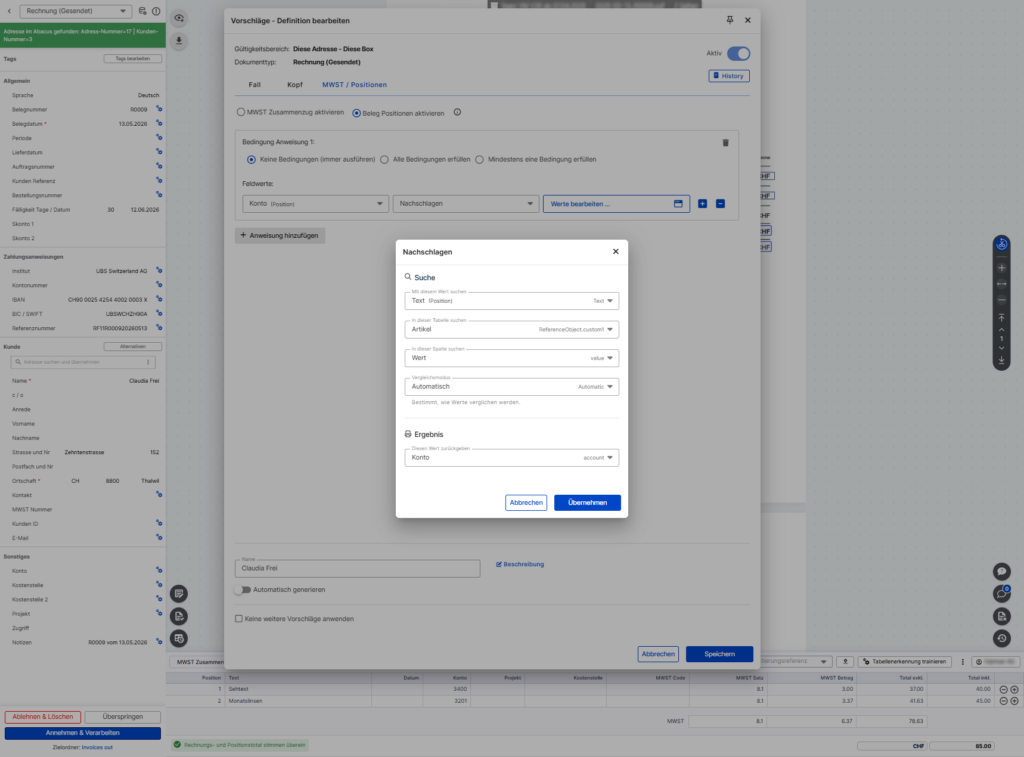
Comparison mode
The comparison mode defines how values in the reference table are compared.
| Automatic | Depending on the search field used: “Equals” is used to search for “Value”. For “Description”, the search is first performed with “Equals” and then with “Contains”. |
| Equals | Only one exact match is taken into account. |
| Contains | Entries containing the search value are taken into account. |
| StartsWith | Entries that begin with the search value are taken into account. |
“LookupValue” Expression Function
In addition to the “Lookup” function, the “LookupValue” expression function can be used to search for values directly in reference tables.
Important: In the LookupValue, “global*” must be used for the reference table at the organizational level and “custom*” at the box level.
Syntax
LookupValue (“Reference table”, “Search field in reference table”, “Input field”, “Return from reference table”)
Syntax with comparison mode
LookupValue (“Reference table”, “Search field in reference table”, “Input field”, “Return from reference table”, “StartsWith”)
LookupValue (“Reference table”, “Search field in reference table”, “Input field”, “Return from reference table”, “Contains”)
Example with Abacus table
LookupValue (“Accounts”, “Description”, “Document.UserField1”, “Value” )
Example with free account assignment reference
LookupValue (“ReferenceObject.custom1”, “Description”, “Custom1”, “Value”, “StartsWith”)
LookupValue (“ReferenceObject.custom1”, “Description”, “Custom1”, “Value”, “Contains”)
Notes
- The function can be used at both header and item level.
- Only the predefined columns can be used.
- The internal reference ID is generated automatically.
- In the LookupValue, “global*” must be used for the reference table at the organization level and “custom*” at the box level.
The following video shows an example of how the free account assignment references could be set up.
Did this answer your question?
Related articles
Update suggestions
With “Suggestions”, different field values can be set in the document based on recognition characteristics – both at header and item level.For example, an invoice...
Validations
With “Validations”, fields can be checked for their value and a corresponding message can be displayed.This is possible at both header and position level. Two examples ...
Train DeepO
All fields in the DeepBox can be filled manually. The “Train DeepO” function can be used to automate the filling of the fields. Activation To be able to use the ...