Define Billing Recipient
Automatically translated
Die Rechnungsinformationen Ihrer Organisation können Sie jederzeit im DeepAdmin verwalten und anpassen.
Edit Billing Information
- Sign in to DeepCloud.
- Navigate to Billing → Billing Information.
- Click Edit next to the billing information you want to update.
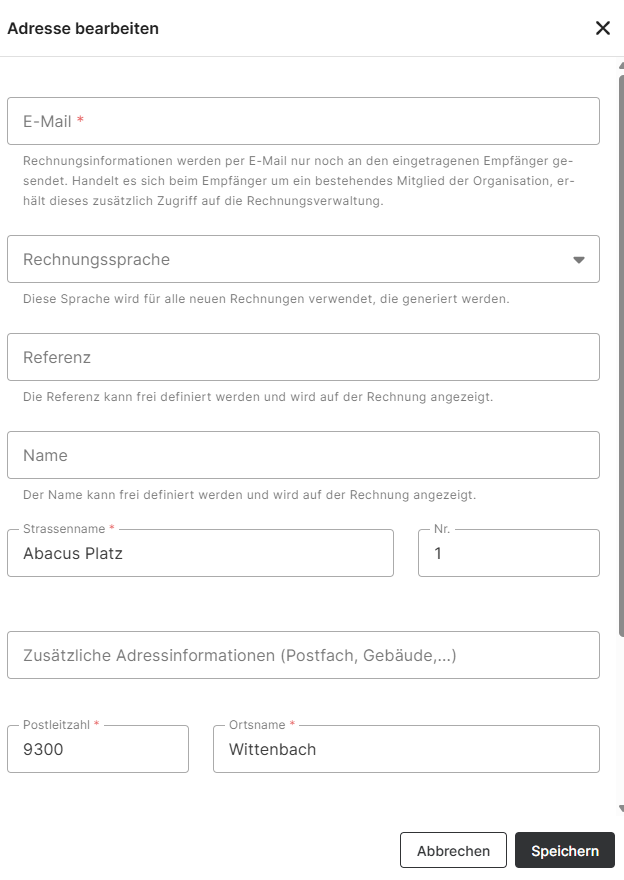
- Update the required information.
- Click Save to apply your changes.
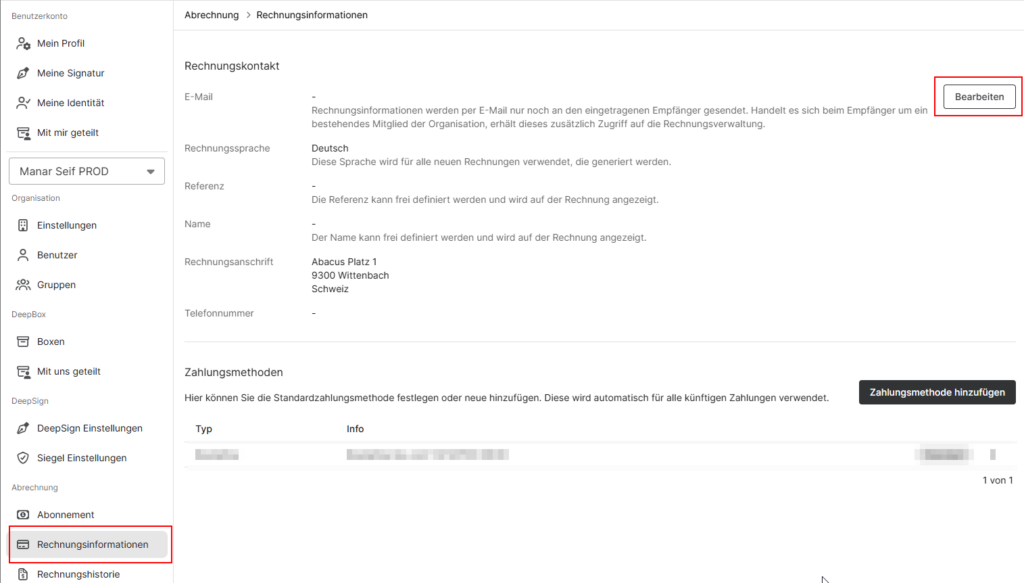
The following billing information can be updated:
- Billing recipient’s email address
- Invoice language
- Reference
- Name
- Street and house number
- Additional address information (e.g. P.O. Box)
- Postal code and city
Note: If no billing administrator has been specified, all organization owners will continue to receive billing-related notifications.
Tip: Using the Mail-to-Box feature, you can automate invoice processing by sending invoices directly to an Inbox. For more information, see https://support.deepcloud.swiss/article/mail-to-box/.
Did this answer your question?
Related articles
Where can I view my invoices?
In the account management, invoices are available under “Invoice history”. By clicking on the three vertical dots, the invoice can be displayed and downloaded as a PDF.
How can I change my subscription?
You can make changes to your subscription yourself under the menu item “Subscription” in the account management. You can access the subscription overview under ...
How do I change a payment method?
The payment method can be adjusted and managed by the owner of the organization in the account management under “Billing Information“. In the “Payment ...