Show and hide fields in the DeepO Editor
Automatically translated
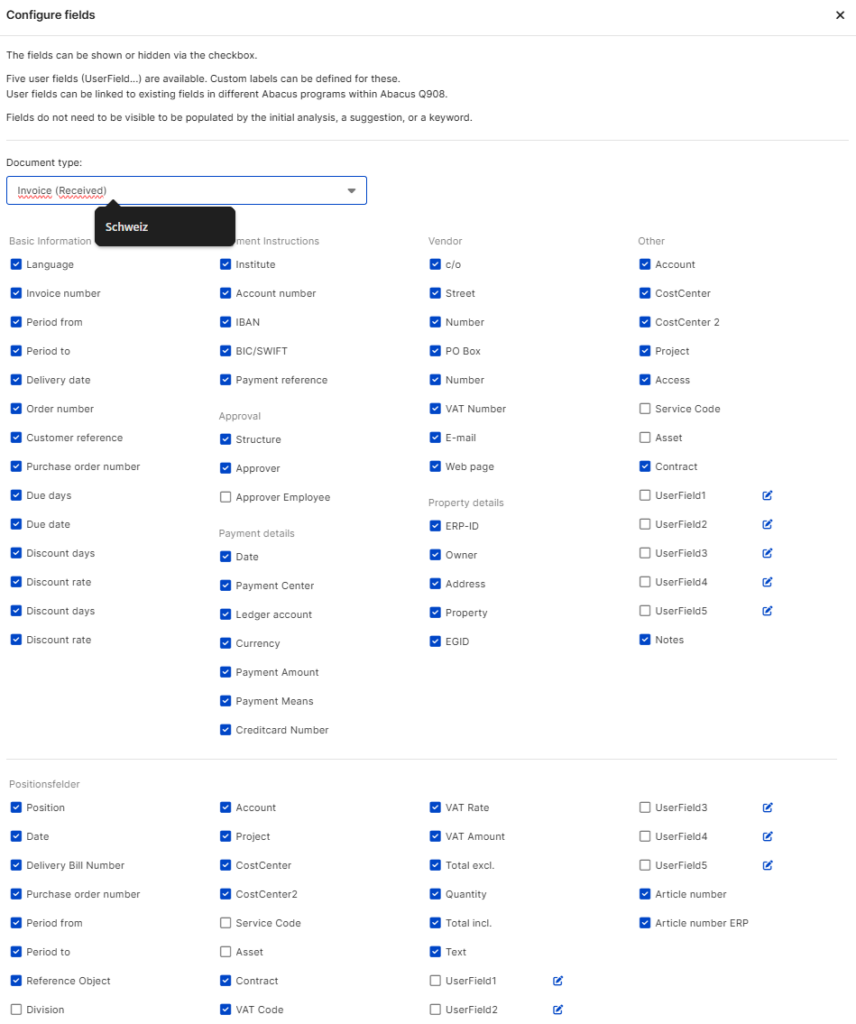
In the DeepO Editor, numerous fields are available at header and item level, which can be individually configured as required.
These fields can be shown and hidden using the following setting:
DeepO settings > Box settings > Further settings > Fields in the DeepO Editor > Configure fields.
Here you can select which fields are to be displayed or hidden for each document type.
Did this answer your question?
Related articles
Navigation and recording in position fields
In the DeepO Editor, values within the items can also be entered or corrected manually. The following tips will help you to navigate efficiently through the fields and enter data ...
Train DeepO
All fields in the DeepBox can be filled manually. The “Train DeepO” function can be used to automate the filling of the fields. Activation To be able to use the ...
Which documents does DeepO recognize?
DeepBox uses a scalable, intelligent recognition system that captures information from documents. This program is called DeepO. This recognition takes place in the inbox and can be...