VAT summary / Activate document items

Automatically translated
As of 26.02.2026, the two tabs “VAT” and “Positions” in the DeepO editor have been harmonized. Suggestions can now also be created in the VAT summary.
Basic principle
- VAT summary: One item is generated for each tax rate.
- Voucher items: Each line item is transferred individually so that they can be assigned to different cost centers (CC), for example.
Hierarchy of activation
Whether VAT summary or voucher items are active is determined by the following hierarchy (from general to specific):
- Setting on the address definition
(DeepO settings – definition per address) - Setting the last applied suggestions
- Manual override in the DeepO Editor
A manual adjustment in the editor thus overrides both the address setting and all suggestions.
Regulation for suggestions (from 26.02.2026)
From 26.02.2026, each new suggestion must explicitly define whether it applies to the VAT summary or to the document items.
The default value for a new suggestion is now: → “Activate VAT grouping”
- The “automatic” option is no longer available for new suggestions.
- The suggestions are still applied in the familiar hierarchical order (from the most global to the most specific suggestion).
- The last applied suggestion decides within this logic which setting is active.
Existing suggestions (created before 26.02.2026)
The “automatic” option is still available for older suggestions. This ensures that existing configurations are applied unchanged and correctly.
The following applies to new suggestions:
The user must consciously decide whether the respective suggestion activates VAT summary or document items.
Example: Different accounting at Swisscom (mobile vs. Internet)
In practice, it can make sense to book services from the same supplier differently. In the example of the supplier “Swisscom AG”, for example, the following requirement may exist:
- Mobile invoices should be distributed to different cost centers (e.g. per employee).
→ Document positions are therefore required. - Internet invoices generally relate to one location and are posted uniformly.
→ The VAT summary is therefore sufficient and desired.
For this technical distinction to work correctly, the suggestions must be clearly distinguished from each other, e.g. by means of a distinguishing feature or condition.
Correct configuration:
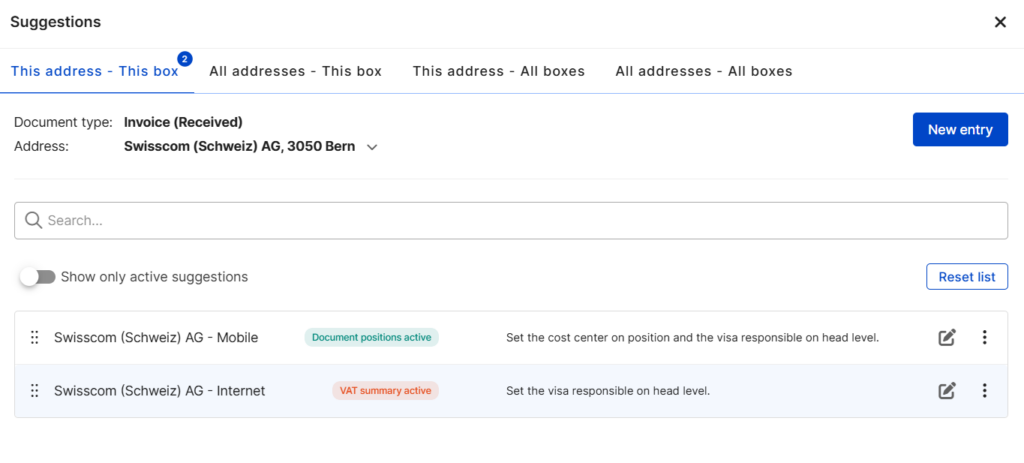
- Swisscom with “Mobile” feature
→ Activate document items - Swisscom with “Internet” feature
→ Activate VAT grouping
Result:
- In the case of mobile invoices, the individual items are transferred and can be assigned separately.
- For Internet invoices, a collective item is generated for each tax rate.
- Only one suitable suggestion is applied at a time (depending on the recognition feature in the document)
- The control whether VAT summary or document items are posted is correct
Did this answer your question?
Related articles
Standardised VAT and item workflow
The “VAT tab” in the DeepO Editor has been fundamentally revised and aligned with the “Positions tab”. Previously, only manual entries were possible in the ...

Update suggestions
With “Suggestions”, different field values can be set in the document based on recognition characteristics – both at header and item level.For example, an invoice...
Train table recognition
Table recognition can be trained for an address if DeepO does not recognize it correctly by default. In this example, the desired table is not recognized correctly by DeepO and ...