New or Lost Cell Phone (DeepPortal)
Automatically translated
Getting a new smartphone or losing your device affects two-factor authentication (2FA) for your DeepCloud account. Please follow these steps.
No access to the old device
If you no longer have access to your previous smartphone, please contact DeepCloud Support. For security reasons, we must verify your identity before resetting your 2FA. To do this, you will be asked a few security questions. Once your identity has been successfully verified, the 2FA can be reset and then set up again on your new smartphone.
Setting Up 2FA on a New Cell Phone
2FA protects your login to your DeepCloud account, for example, for DeepBox or DeepSign.
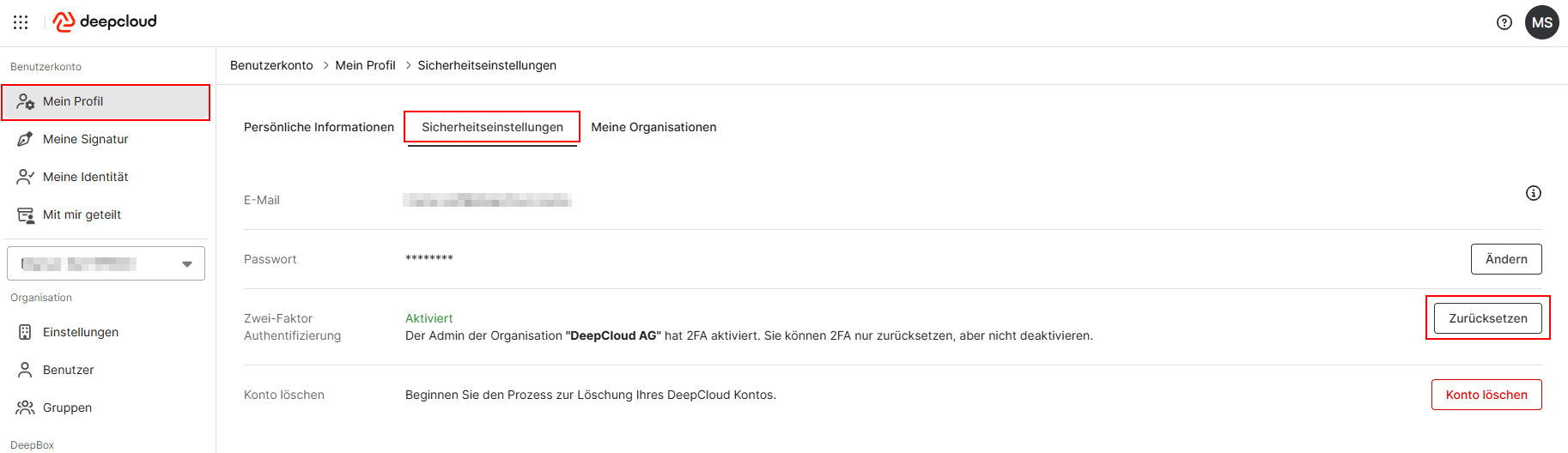
If you still have access to your previous smartphone, you can reset 2FA through your DeepCloud profile:
- Log in to your DeepCloud account
- Click on your initials in the upper-right corner and open Account Management
- Click “My Profile“
- Go to “Security Settings“
- For two-factor authentication (2FA), select the reset option.
Next, follow the on-screen instructions and set up 2FA again on your new smartphone.
For setup instructions, see the article “Two-Factor Authentication.” Supported apps include Microsoft Authenticator, Google Authenticator, and FreeOTP.
Did this answer your question?

