Where can I reset or change my password?
Automatically translated
You can change your password in your account settings under “Security Settings” next to “Password.”
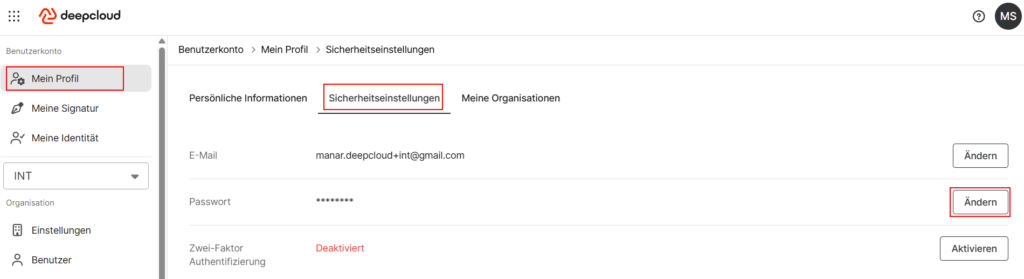
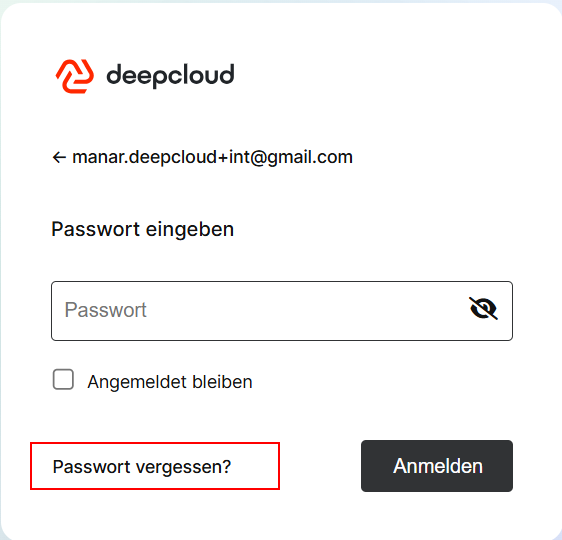
If you have forgotten your password, you can easily reset it on the login page using the “Forgot Password” feature.
If you need further support, DeepCloud Support is happy to help.
Did this answer your question?
Related articles
Two-Factor Authentication – 2FA
Two-factor authentication provides an extra layer of protection for your DeepCloud account against unauthorized access. When logging in, you’ll need both your password and a ...
New or Lost Cell Phone (DeepPortal)
Getting a new smartphone or losing your device affects two-factor authentication (2FA) for your DeepCloud account. Please follow these steps. No access to the old device If you no ...

